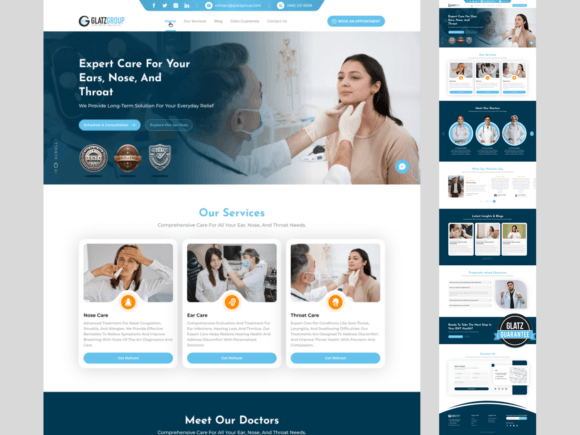
Designing a Modern ENT Clinic Website: A Professional UI Kit Guide
First impressions are everything, especially in healthcare. For an Ear, Nose, and Throat specialist, a website isn't just a digital brochure—it's the first point of contact, a trust-builder, and a critical patient resource. A cluttered, outdated, or difficult-to-navigate site can send potential patients looking elsewhere. This is where a thoughtfully crafted design system, like the ENT Doctor Website Design UI Kit, transforms the digital front door of a practice from a liability into a powerful asset. It’s not about flashy gimmicks; it’s about clear communication, intuitive function, and a professional aesthetic that mirrors the quality of care provided in the clinic.
More Than Just a Pretty Face: The Anatomy of Effective Medical Design
The true value of a specialized UI kit lies in its understanding of the unique needs of a medical practice. It’s a pre-built framework that addresses the specific pain points of a clinic's online presence. Imagine a layout where a new patient can effortlessly find the "Book an Appointment" button, or a parent can quickly locate information about pediatric tonsillectomies. This kit prioritizes that kind of user journey. The design language—clean lines, ample white space, and calming, professional color palettes—is chosen specifically to evoke a sense of trust and competence. It moves beyond generic templates to provide a visual shorthand for "reliable," "modern," and "patient-focused."
For the practice manager or the specialist themselves, this approach eliminates guesswork. The kit includes essential components pre-designed and ready to be customized: detailed doctor profile sections to highlight expertise and build rapport, clear service breakdowns explaining procedures from sinus surgery to hearing tests, and integrated appointment booking modules. This isn't just about making a site look good; it's about building a functional tool that streamlines patient intake and reduces administrative phone calls. The responsive design ensures this seamless experience holds true whether a patient is browsing on a desktop at home or a smartphone in a waiting room.
Building a Cohesive Brand Identity Beyond the Clinic Walls
A strong brand is consistent. The design principles used for your website should extend to every patient touchpoint, creating a unified and professional image. The typography, iconography, and color scheme defined in a comprehensive UI kit become the foundation of your entire visual identity. This consistency is what builds recognition and reinforces your professionalism over time.
Think about the practical applications. The same clean, sans-serif font used for your website headlines can be used for signage in your office, creating a familiar feel for patients. The custom SVG icons representing different services can be adapted for use in printed brochures or social media graphics. The color palette can guide the design of your email newsletters, appointment reminder cards, and even the merchandise in your waiting room. By establishing these visual assets digitally first, you create a versatile toolkit for all your marketing materials, ensuring every piece feels intentionally crafted and connected to your core practice identity.
Practical Customization: Making the Design System Your Own
The term "fully customizable" is key. A professional kit provides the structure and the high-quality building blocks—the pixel-perfect UI components, the auto-layout grids in Figma, the included font files—but it invites you to infuse it with your practice's unique character. This is where the design becomes truly powerful.
Choosing Your Visual Voice: The kit likely includes a modern, trustworthy typeface. Your job is to select the specific weights and styles that best match your practice's personality. A bold, confident weight might be perfect for a surgical specialist's site, while a lighter, more approachable style could suit a family-focused clinic. This choice directly impacts readability and the overall tone of your content.
Strategic Font Pairing: While the primary font sets the tone, pairing it with a complementary secondary font for body text or subheadings can enhance hierarchy and readability. The goal is contrast without conflict. A clean sans-serif for headlines often pairs beautifully with a highly readable serif or sans-serif for longer paragraphs, guiding the reader's eye naturally through the information.
Color and Imagery: Swap out the placeholder images with authentic photos of your team and clinic. Adjust the primary color from the default blue to a calming teal or a confident navy that reflects your brand. These personalizations transform a generic "medical website" into your clinic's website, fostering a stronger connection with your community.
Launching with Confidence: From Design File to Live Patient Portal
The ultimate goal is a functional, beautiful website that serves your patients and grows your practice. A well-structured UI kit dramatically accelerates this process. With the source files—including the editable Figma project, optimized assets, and font files—a designer or even a tech-savvy practice manager can move from concept to launch much faster than starting from scratch. This efficiency allows you to focus your energy on what matters: crafting compelling content about your services, writing helpful patient education articles, and ensuring your contact information and booking process are flawless.
Remember, the design is the vehicle, but the content is the destination. Use the intuitive layouts to present complex medical information in digestible chunks. Leverage the doctor profile sections to tell your story and build trust before a patient ever walks through the door. By combining a professional, patient-centric design system with clear, empathetic content, you create more than a website—you create a welcoming digital extension of your practice that patients will appreciate and return to.