Domuni: Crafting Polished Presentations with Ease
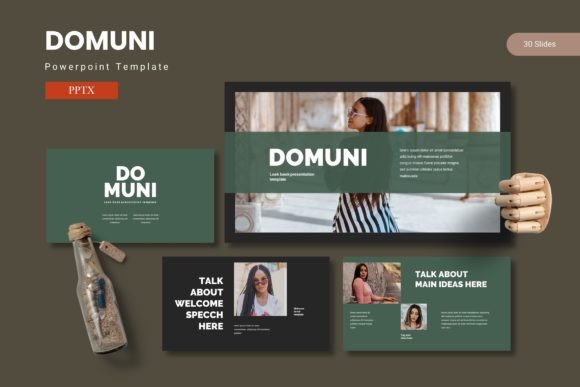
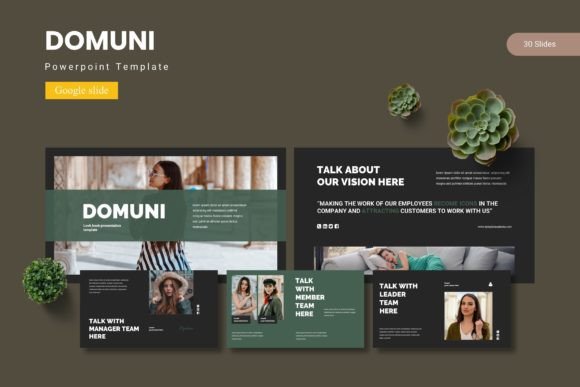
Imagine needing to assemble a presentation for a crucial client pitch, a team workshop, or a product launch. The clock is ticking, and the default templates feel tired and uninspired. You want something that looks professionally designed, cohesive, and visually engaging without spending hours dragging elements around. This is the precise challenge the Domuni - Google Slide Template is built to solve. It offers a comprehensive suite of slide designs that provide a polished foundation for anyone who needs to communicate ideas effectively and beautifully.
This isn't just a collection of empty slides. It's a toolkit designed for real-world use, understanding that a great presentation needs structure, visual hierarchy, and a consistent aesthetic. The core of its appeal lies in its blend of flexibility and professional design, allowing you to focus on your message rather than wrestling with formatting.
A Foundation Built on Visual Harmony
What sets a presentation apart is often the unseen architecture. The Domuni - Google Slide Template is built upon master slides, a feature that ensures every element you place—whether it's a chart, a photo, or a text box—adheres to a consistent grid and style. This foundational approach guarantees visual harmony across your entire deck. You won't find misaligned text boxes or awkward spacing because the template's structure guides your content into a balanced layout.
The package includes over 150 total slides, organized into five premade color schemes with 30 slides each. This variety is practical. A marketing team might use a vibrant color scheme for an internal brainstorm, while a consultant might choose a more subdued palette for a client-facing report. The inclusion of section break slides is a small but significant detail, helping your audience navigate through longer presentations and grasp the structure of your narrative. Each element, from the pixel-perfect illustrations to the picture placeholders, is fully resizable and editable, giving you complete control without sacrificing the design's integrity.
From Brand Presentations to Marketing Assets
The true test of any design asset is its versatility. Where can you effectively deploy the Domuni - Google Slide Template? The applications extend far beyond a standard quarterly review. For entrepreneurs and small business owners, it’s a powerful tool for creating consistent brand identity materials. Imagine presenting a brand strategy to stakeholders using slides that reflect the very visual language you’re proposing. The template can help you build marketing assets like media kits, partnership proposals, and campaign overviews that look as polished as the work you do.
Content creators and bloggers can leverage the gallery and portfolio slides to showcase their work in a compelling, visual format. Instead of a static PDF, a presentation can become an interactive portfolio for potential collaborators. The handcrafted infographics are particularly valuable for translating data into digestible visuals, perfect for social media graphics or blog post summaries. For anyone in packaging design or product development, the slides can be adapted to present mood boards, product specifications, and retail mockups in a clean, professional manner.
Practical Guidance for Effective Use
Having a great template is one thing; using it effectively is another. Here’s how to get the most out of a resource like this:
- Align with Your Project Goals: Before you start, define the purpose of your presentation. Is it to inform, persuade, or inspire? Choose the color scheme and slide layouts that best support that goal. A bold, high-contrast scheme might energize a sales pitch, while a minimalist, monochromatic one could lend authority to a research summary.
- Prioritize Readability: The template provides a structure, but your content is king. Ensure your text is concise and your font choices (even though separate from the template itself) are clear. The given layout space is designed for balance—resist the urge to overcrowd slides with bullet points. Let visuals and key phrases carry the weight.
- Customize with Intention: The drag-and-drop picture placeholder makes swapping images easy, but choose your visuals wisely. High-quality, relevant images that align with your brand’s tone will amplify the template’s professional effect. Use the editable graphics to create custom diagrams that speak directly to your content.
- Maintain Visual Consistency: The strength of the Domuni - Google Slide Template is its built-in consistency. When you add your own elements, try to maintain that harmony. Stick to the provided color palette or introduce one or two new colors that complement it. This reinforces your brand recognition and keeps the presentation looking unified.
The Role of a Professional Toolkit
In the realm of visual communication, the tools you choose send a message. Using a meticulously designed template signals professionalism and attention to detail. It helps bridge the gap between a good idea and a compelling presentation. For the designer, it’s a time-saving asset that provides a reliable starting point. For the entrepreneur, it’s a way to compete with larger organizations by presenting ideas with a level of polish that builds credibility. For the marketer, it’s a framework for creating diverse marketing assets that all feel connected.
The inclusion of a readme file with font and photo information is a thoughtful touch, acknowledging that the final look often depends on these complementary assets. While the template itself is a design asset for structure and layout, it invites you to layer your own typographic and photographic choices on top, making the end result uniquely yours.
Ultimately, the goal of any presentation is clear communication. The Domuni - Google Slide Template handles the heavy lifting of design structure, allowing you to channel your energy into crafting a clear, persuasive, and visually engaging story. It’s less about flashy effects and more about providing a reliable, adaptable framework that elevates your content and helps you connect with your audience, one thoughtfully designed slide at a time.