Eroona - Keynote Template: A Visual System for Impactful Presentations
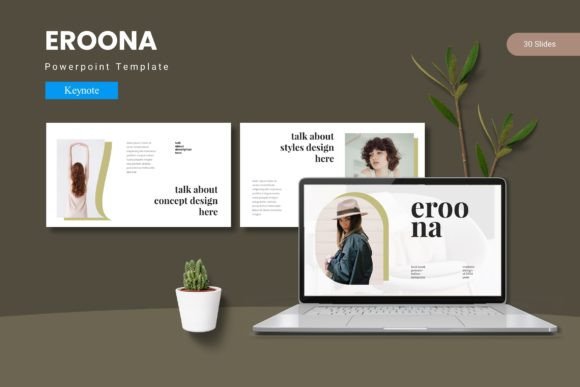
You have a compelling story to tell, a groundbreaking idea to pitch, or a critical quarterly update to share. The content is solid, your delivery will be practiced, but there's one silent saboteur of audience attention: a disjointed, uninspired slide deck. The gap between a good presentation and a great one often lies in its visual coherence and professional polish. This is where a thoughtfully constructed design asset like the Eroona - Keynote Template transforms your slides from a mere backdrop into a powerful communication tool. It’s not about flashy animations; it’s about creating a seamless, visually engaging experience that supports your message and leaves a lasting mark.
Beyond Single Slides: Building a Cohesive Visual Narrative
Many presenters fall into the trap of designing slides in isolation, leading to a deck that feels fragmented. One slide might use a bold header with a dark background, the next a light theme with a delicate script font. This inconsistency forces your audience to constantly re-orient themselves, pulling focus away from your content. The core value of a system like Eroona is its foundation in master slides. This means every layout, from title cards to data-driven charts, shares a unified design DNA. Your fonts, color palette, and spacing are predetermined to work in harmony. This approach is fundamental to strong brand identity and visual consistency. When your internal team meeting deck, your client pitch, and your conference keynote all share this same visual language, you begin to build brand recognition that extends far beyond a single presentation.
Practical Applications: From Investor Pitches to Creative Portfolios
The true test of any design template is its versatility. The Eroona system, with its 150+ total slides and 5 premade color variations, is engineered to adapt to a multitude of professional scenarios. Consider the entrepreneur finalizing a pitch deck. Instead of struggling with alignment, they can use the handcrafted infographic slides to present market data clearly, and the gallery and portfolio slide to showcase product mockups with pixel-perfect illustrations. The drag-and-drop picture placeholder makes it simple to insert team photos or product shots without breaking the layout.
For a marketing manager, the template becomes a hub for marketing assets. The same color scheme used in the presentation can inform the design of social media graphics, creating a cross-channel visual thread. The section break slides are perfect for delineating chapters in a webinar or workshop, while the clean typography ensures readability whether you're presenting on a large screen or sharing a PDF as a digital product. A creative professional might leverage the modern layouts to structure an editorial design proposal or a packaging design case study, using the slides as a mood board and project plan in one.
Strategic Customization: Making the Template Your Own
Having a robust template is the starting point, not the finish line. The goal is to adapt it to your specific project goals. Here’s how to approach customization strategically:
- Color Scheme Alignment: The five included color schemes offer a starting point. Take the time to adjust these hex codes to match your exact brand guidelines. This single step can dramatically increase the professional feel of the deck.
- Typography for Tone: Review the included font styles. Are you aiming for a modern, approachable vibe with a sans serif font? Or does a more traditional, authoritative tone require a serif font? Test different font pairing options—perhaps a clean sans serif for body text with a distinctive display font for headings—to find what resonates with your audience.
- Layout Logic: Don't just fill every slide with text. Use the variety of layouts to control pacing and emphasis. A data-heavy slide might need a complex infographic layout, while a key takeaway deserves a simple, bold statement on a clean background. This thoughtful sequencing improves audience engagement.
Key Considerations for a Polished Final Product
As you customize, keep these practical details in mind to ensure a flawless result:
- Readability is Paramount: Always preview your slides in presentation mode. Check text contrast against backgrounds, especially on the section break slides. Ensure font sizes are legible from the back of a room if presenting live.
- Asset Management: The template includes resizable and editable graphics. Organize your custom icons and illustrations in a dedicated folder to streamline future edits. Consistent use of these graphic elements reinforces your visual system.
- Licensing Clarity: As with any premium font or design asset, confirm the commercial licensing terms. The included Readme First document is your guide. Understanding the license ensures you can confidently use the template for client work, commercial projects, and merchandise without legal concerns.
Ultimately, a presentation template is a tool for clear thinking and effective communication. The Eroona - Keynote Template provides a structured yet flexible framework that handles the heavy lifting of design cohesion. This frees you to focus on what truly matters: crafting a compelling narrative, refining your message, and connecting with your audience. By investing time in thoughtful customization, you transform a collection of slides into a memorable visual experience that amplifies your professional credibility and ensures your ideas are not just heard, but remembered.