Berora: Crafting Visual Narratives with 150+ Google Slides
We have all sat through presentations that feel flat, lifeless, or overwhelming with cluttered text and mismatched colors. In a world where visual communication is currency, relying on default templates or disjointed design choices can undermine your credibility before you even speak. Whether you are a startup founder pitching to investors, a marketer presenting a quarterly strategy, or a creative professional showcasing a portfolio, the vehicle for your message matters just as much as the message itself. This is where the architecture of a template comes into play. The Berora - Google Slide Template offers a robust framework that bridges the gap between raw data and compelling storytelling, providing a structure that supports clarity, professionalism, and aesthetic appeal.
Visual Architecture and Design Integrity
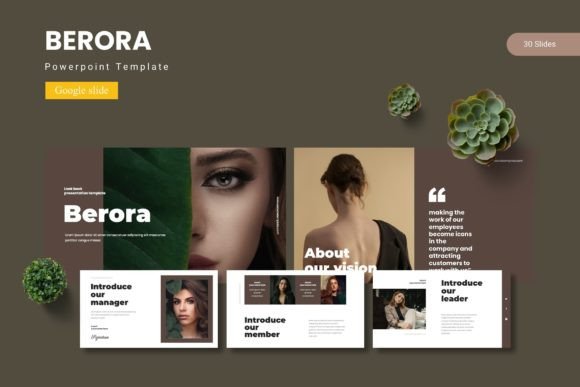
At its core, Berora is built on the principle of visual harmony. With over 150 total slides spread across five premade color schemes, it moves beyond the concept of a static page and enters the realm of a comprehensive design system. The appeal lies in the "pixel-perfect illustrations" and the meticulous arrangement of elements. For designers and brand strategists, consistency is key. When you switch between a data-heavy slide and a gallery layout, the visual language remains cohesive because the template is based on Master Slides. This ensures that your typography, spacing, and color application remain uniform, which is vital for maintaining a professional brand identity.
The inclusion of five distinct color variations is particularly practical. Color psychology plays a massive role in how an audience receives information. A deep, muted palette might work best for a serious financial report, while a vibrant, high-contrast scheme could be ideal for a creative agency pitch. Berora allows you to switch the entire mood of your presentation without redesigning the layout, saving hours of production time while ensuring the visual tone matches your specific goals.
Beyond the Slideshow: Integrating into Brand Ecosystems
While the primary function of this asset is for Google Slides, its utility extends far beyond the projector screen. In modern marketing, content needs to be repurposed efficiently. The design assets included in Berora—particularly the handcrafted infographics and resizable graphics—are valuable resources for broader visual communication strategies.
Consider the needs of a content creator or a small business owner. You might start with a presentation for a client meeting, but the visual elements can be extracted and adapted for various touchpoints:
- Social Media Graphics: Use the section break slides as high-impact story backgrounds or quote cards for Instagram and LinkedIn.
- Digital Products & E-books: The "Pixel-perfect illustrations" and layout grids are perfect for structuring PDFs, whitepapers, or digital guides. The gallery and portfolio slides can be repurposed to showcase case studies within a downloadable asset.
- Web Design Mockups: The clean, modern typography and structured layouts can serve as wireframes or mood boards for website redesigns.
- Print Materials: Because the graphics are resizable and editable, specific infographics can be adapted for brochures, posters, or one-pagers.
This versatility makes the template a hub for brand identity management. Instead of purchasing separate assets for your slide deck, your PDF whitepaper, and your social media kit, you can utilize a unified system that ensures every piece of content looks like it belongs to the same family.
Practicality and User Experience
One of the most significant hurdles in design is the technical barrier. Many high-end templates require complex software or advanced skills to modify. Berora is designed with a "drag & drop" philosophy in mind. The Picture Placeholder feature is a standout for busy professionals. It allows you to insert your own imagery without needing to manually crop or resize images to fit specific aspect ratios. This feature alone can drastically reduce the friction of content creation, allowing entrepreneurs to focus on their narrative rather than wrestling with formatting tools.
Furthermore, the structure encourages best practices in information hierarchy. The inclusion of dedicated Section Break Slides helps the audience mentally "reset" and prepare for a new topic, which improves retention and engagement. It prevents the "wall of text" phenomenon by forcing the creator to break information into digestible chunks. Whether you are using it for an editorial layout or a corporate report, the template guides you toward a cleaner, more readable presentation style.
Strategic Application for Marketing and Business
For those in marketing and branding, a presentation is often the final step in a sales funnel or the first step in a partnership. The Berora template is not just about making things look pretty; it is about persuasion. A clean, modern layout signals competence. When you present a strategy using a cohesive design system—where the charts, the text, and the images all speak the same visual language—you build trust with your audience.
The template is particularly useful for:
- Corporate Identity: Standardizing how your team presents internal data or external proposals.
- Creative Pitches: Showcasing photography, graphic design, or art in a way that doesn't overshadow the work itself.
- Event Invitations: Creating digital invitations for webinars or launches that look bespoke and professional.
By utilizing the Master Slides, you can also ensure that if you update a logo or a brand color once, it updates across the entire deck. This scalability is essential for growing businesses that need to adapt quickly without re-creating assets from scratch.
Conclusion: A Tool for Modern Storytellers
In a landscape saturated with content, the tools you choose to present your ideas can set you apart. The Berora - Google Slide Template is more than just a collection of slides; it is a flexible canvas designed for the demands of modern visual communication. It respects the user's time through easy-to-use placeholders and master slides, while offering the depth required for sophisticated infographics and portfolio presentations. For the designer seeking efficiency, the entrepreneur seeking polish, or the marketer seeking consistency, it provides a solid foundation to build upon, ensuring that the final product is not just seen, but remembered.