Build a Stunning Car Rental App with This UI Kit
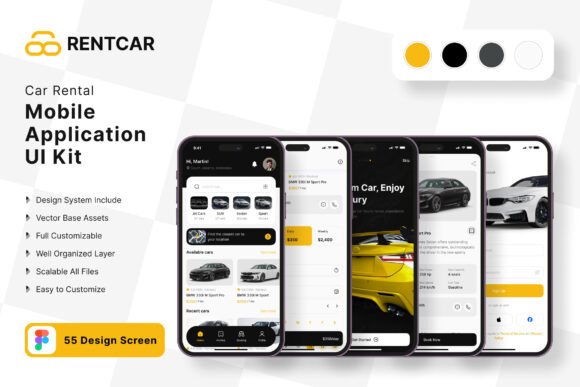
You have a brilliant idea for a car rental service, but the thought of designing a mobile app from scratch feels overwhelming. Where do you even begin with the user flow, the visual style, and ensuring every screen feels cohesive? This is where a thoughtfully crafted UI kit becomes your most valuable asset. Instead of wrestling with blank canvases and inconsistent elements, you can start with a professional foundation. The Car Rental App Mobile UI Kit offers exactly that—a comprehensive collection of 37 high-quality templates designed to streamline your development process and elevate your final product.
A Practical Toolkit for Real-World Projects
Imagine having a library of pre-designed screens for everything a car rental app needs: user onboarding, vehicle listings, booking confirmations, payment interfaces, user profiles, and support sections. This kit provides that structure. It’s not about forcing you into a rigid design; it’s about giving you a robust starting point. The templates are built in Figma, making collaboration and iteration seamless. You can easily customize every element—swap colors to match your brand, adjust layouts for different content needs, or remove sections that don't apply to your specific service model. This flexibility is crucial for entrepreneurs and designers who need to move quickly without sacrificing quality.
The true value lies in its practical application for building a brand identity. A consistent visual language across every touchpoint of your app builds trust and recognition. By using this kit, you ensure that your typography, button styles, spacing, and iconography are harmonious from the first screen to the last. This visual consistency is what separates amateur apps from professional, trustworthy services in the eyes of users.
More Than Just Screens: A Foundation for Your Brand
While the kit is built for a mobile application, its components have far-reaching utility for your entire marketing ecosystem. The UI elements—icons, buttons, and cards—can be repurposed to create cohesive social media graphics, website hero sections, or digital ads. The clean, modern aesthetic translates well to packaging design for promotional materials or even the design of print materials like flyers and business cards. Think of the color palettes and style guides you develop within the app as the blueprint for your broader brand identity.
For content creators and marketers, this kit is a hidden gem. The templates provide a perfect framework for designing editorial layouts for blog posts detailing travel tips or rental guides. The display font choices and layout structures can inspire the look of your email newsletters or digital products like downloadable checklists. The scalability of the vector elements means your designs will look crisp on everything from a small mobile screen to a large poster at a trade show.
Key Features That Empower Your Design Process
Let’s break down what makes this particular kit a powerful design asset. The focus on pixel-perfect design ensures your app will look sharp and intentional. With over 80 UI elements and 37 screens, you have the building blocks for a comprehensive user experience without needing to design each piece from the ground up. The inclusion of free fonts and vector icons eliminates the hassle of sourcing and licensing separate assets, allowing you to focus on creativity and functionality.
The fact that it’s fully layered and uses symbol objects in Figma is a game-changer for efficiency. Need to change the primary button color across all screens? Update the symbol once, and it propagates everywhere. This non-destructive editing capability saves countless hours and reduces the risk of errors. For small business owners or solo developers, this efficiency directly translates to faster time-to-market and lower development costs.
Making It Your Own: Practical Customization Tips
Adopting a UI kit doesn’t mean your app will look generic. The key is thoughtful customization. Start by defining your brand’s color palette. Use the kit’s easy to change color style feature to apply your primary, secondary, and accent colors across all templates. Next, consider your typography. While the kit includes fonts, you can integrate your own premium font or modern typeface to better reflect your brand’s personality—whether it’s a sleek sans serif font for a tech-forward feel or a friendly script font for a more personal touch.
Don’t just use the screens as-is. Mix and match components. Combine the header from one template with the content layout of another. Add or subtract elements based on your specific feature set. For instance, if your service includes a loyalty program, you might adapt a user profile screen to include a points tracker. The goal is to use the kit as a flexible toolkit, not a finished product. This approach ensures your final app is uniquely yours while benefiting from professional design principles.
Ensuring a Professional and Engaging User Experience
A beautiful design is only effective if it’s also usable. This kit emphasizes readability and intuitive navigation, which are critical for user engagement. Clear visual hierarchy guides users through the booking process, while well-spaced elements prevent cognitive overload. When customizing, always prioritize readability considerations: ensure sufficient contrast between text and background, choose legible font sizes for body copy, and maintain clear button labels.
Before finalizing your designs, conduct simple tests. Share prototypes with potential users or colleagues. Ask them to complete basic tasks, like searching for a car or viewing a booking confirmation. Their feedback will highlight any areas where the interface might be confusing, allowing you to iterate effectively. This user-centered approach, combined with the solid foundation of the UI kit, will help you create an app that is not only visually appealing but also genuinely functional and enjoyable to use.
Ultimately, the Car Rental App Mobile UI Kit is more than a collection of screens. It’s a strategic starting point that empowers you to bring your vision to life with professionalism and efficiency. By leveraging its customizable framework, you can build a compelling mobile presence that strengthens your brand, engages your audience, and stands out in a competitive market.