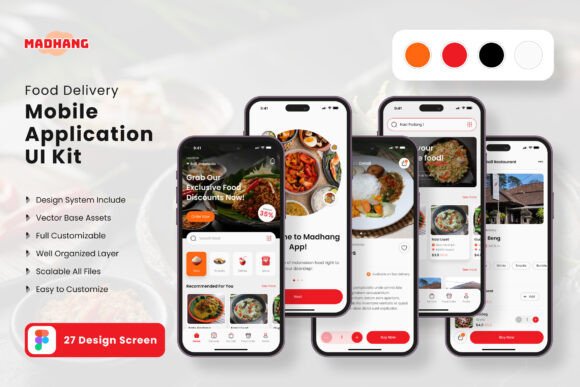
Launch Your Food Delivery App Faster with a Premium UI Kit
Building a food delivery app from scratch is a monumental task. It’s not just about writing code; it’s about crafting an experience that feels intuitive, trustworthy, and visually appetizing. For entrepreneurs and designers, staring at a blank canvas can be the biggest hurdle. The good news? You don’t have to design every single screen from the ground up. A thoughtfully constructed UI kit provides the foundational bricks and mortar, letting you focus on the unique architecture of your vision rather than reinventing the wheel.
A Head Start on Visual Cohesion and User Experience
The Food Delivery App Mobile UI KIT is a collection of 27 meticulously crafted, pixel-perfect screen designs. Think of it as a comprehensive design language for your application. Instead of worrying whether your "Add to Cart" button matches your "Order Summary" page, this kit ensures every element speaks the same visual dialect from the first tap. This consistency is crucial for building user trust. When an app feels polished and predictable, users are more likely to complete a purchase and return again.
Beyond mere screens, the kit includes over 80 UI elements—the small, interactive pieces that make an app functional and friendly. Buttons, input fields, navigation bars, icons, and cards are all designed to work in harmony. This isn't just about looking good; it's about reducing cognitive load for your users. A well-organized checkout flow or a clear restaurant listing directly translates to higher conversion rates and a better overall brand perception.
Practical Power for Entrepreneurs and Designers
For the small business owner or startup founder, time is the most valuable resource. This UI kit is a strategic asset that accelerates development. You can present a high-fidelity, interactive prototype to investors or developers much faster than if you were starting from zero. It bridges the gap between a business idea and a tangible product demonstration, making your pitch more compelling and your project timeline more realistic.
Designers and agencies will find it an invaluable tool for streamlining client work. The kit’s fully editable nature in Figma means you can seamlessly adapt it to a client’s specific brand guidelines. Swap out the color palette to match their logo, adjust typography to reflect their voice, and rearrange modules to fit their unique service model. This flexibility allows you to deliver professional, customized results efficiently, freeing up creative energy for solving bigger strategic problems rather than drawing basic icons.
Building a Recognizable Brand Identity
Your app’s interface is your digital storefront. The visual style you choose communicates your brand’s personality before a user even reads a word. Is your food delivery service modern and minimalist? Or is it vibrant and playful? The scalable vectors and easy-to-change color styles within this kit allow you to experiment with different brand identities quickly. You can test how a deep, sophisticated color scheme feels compared to a bright, energetic one, all while maintaining the structural integrity of the design.
This process of visual experimentation is key to developing strong brand recognition. A consistent and appealing visual language helps your app stand out in a crowded marketplace. When users see your distinctive color scheme or icon style elsewhere—on your website, social media, or packaging—they immediately connect it with their experience in the app, reinforcing your brand in their mind.
Beyond the App: Expanding Your Design Assets
The utility of a well-designed UI kit often extends far beyond the mobile application itself. The visual components and style principles established in the kit can become the foundation for a wider suite of design assets. The clean, modern typography and structured layouts are perfect for creating cohesive marketing materials.
Consider using the design language to create:
- Social media graphics and stories that feel native to your app’s visual world.
- Website landing pages that mirror the app’s user experience for a seamless customer journey.
- Presentation decks and investor materials that look polished and professional.
- Print materials like flyers or promotional posters for local marketing campaigns.
- Email newsletter templates that engage subscribers with familiar and trustworthy visuals.
By deriving your broader marketing collateral from your app’s core design, you ensure everything feels connected. This holistic approach to your brand identity builds credibility and makes your business appear more established and reliable to potential customers.
Key Considerations for Customization and Use
While the kit provides an incredible starting point, successful implementation requires thoughtful customization. Here’s how to get the most out of it:
- Define Your Brand First: Before diving into Figma, have your brand’s color codes, primary and secondary fonts, and logo ready. The kit is designed to be adapted, so having these assets prepared will make the process smooth and intentional.
- Focus on Your Core Flow: You likely don’t need all 27 screens immediately. Identify the critical user journey for your minimum viable product—perhaps the home screen, restaurant menu, cart, and checkout—and perfect those flows first. The kit allows you to easily add or subtract elements to match your specific feature set.
- Test Readability and Accessibility: While the fonts included are free and chosen for clarity, always test your customized version. Ensure text has sufficient contrast against backgrounds and that button sizes are adequate for touch targets. A beautiful app that’s difficult to use fails its primary purpose.
- Understand the Licensing: The kit is a commercial design asset. The included fonts and icons are free for use within your project, but it’s always prudent to double-check the specific licenses for any element you incorporate, especially if your app will be distributed widely. The note that preview images are not included is standard—your final app will use your own photography or licensed stock imagery.
Ultimately, a resource like the Food Delivery App Mobile UI KIT is about empowerment. It democratizes high-quality design, giving you the tools to build something that looks and feels professional without requiring a massive budget or timeline. It’s the scaffolding that allows you to construct a better, more user-friendly product, letting you focus on what truly matters: connecting great food with hungry customers.