Ciruwet: A Complete Google Slides Template for Polished Presentations
You have a fantastic idea, a clear message, and a deadline looming. But when you open a blank presentation file, the cursor blinks back at you mockingly. Crafting a slide deck from scratch is a notorious time-sink, often involving endless tweaks to alignment, color schemes, and image placement. What if you could bypass the foundational design work entirely and jump straight into populating your content with a system that guarantees visual harmony? That’s the promise of a well-structured template, and it’s exactly what the Ciruwet - Google Slide Template delivers for professionals across industries.
A System Built for Visual Harmony and Speed
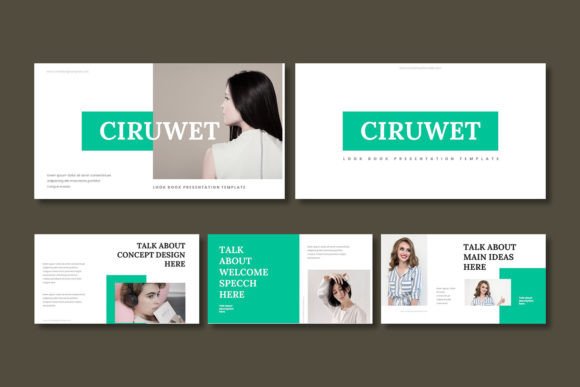
The Ciruwet template isn't just a collection of pretty slides; it's a comprehensive design system. With over 150 total slides organized into five distinct color schemes, it provides a robust starting point for virtually any professional narrative. Each of the five premade colors offers 30 meticulously crafted slides, ensuring you have the right layout for every type of content—whether you're presenting data, telling a story, or showcasing a portfolio. This structure is built upon master slides, a critical feature that allows for consistent global changes. Update a font or color on the master, and the entire presentation reflects that change, enforcing the kind of visual consistency that strengthens brand recognition and professionalism.
For the entrepreneur or small business owner, this means your quarterly business review, investor pitch, and team training materials can all share a cohesive visual language without starting from zero each time. The section break slides provide natural pauses in your narrative, helping to structure complex information into digestible segments for your audience.
Infographics and Imagery That Tell Your Story
Modern audiences are visually literate. Dense text on a slide is often overlooked in favor of clear, compelling graphics. Ciruwet addresses this head-on with handcrafted infographics and pixel-perfect illustrations. These aren't generic clip art; they are designed to communicate concepts like growth, process, connection, and comparison quickly and effectively.
The practical utility is immense. A marketer can use a timeline infographic to outline a campaign rollout. A consultant can use a comparison slide to highlight competitive advantages. A blogger or content creator can use the gallery and portfolio slides to visually showcase their work, be it photography, graphic design, or product samples. The "drag & drop" picture placeholder functionality is a small but significant detail. It removes the technical friction of resizing and cropping images, allowing you to simply select a photo from your files and have it snap perfectly into the designed frame, maintaining the template's clean aesthetic effortlessly.
Beyond the Slideshow: Applying Design Assets to Your Brand
While the primary function is for presentations, the design elements within Ciruwet offer value for broader brand identity work. The five cohesive color schemes can serve as a direct inspiration or starting point for your brand's color palette. The clean, modern typography choices included in the template can inform your font pairing decisions for other projects.
Consider the graphic elements. The resizable and editable vector graphics can be extracted and repurposed. A well-designed icon from a slide about "services" could be adapted for your website's footer. A stylish diagram could be reworked for a print brochure or a social media graphic. This transforms the template from a single-use item into a repository of design assets, helping to maintain visual consistency across all your touchpoints—from your website and social media to printed proposals and merchandise mockups.
Practical Tips for Making the Template Your Own
Adopting a premium template is the first step; customizing it effectively is where the real work begins. Here’s how to ensure Ciruwet enhances rather than overwhelms your project:
Start with Your Brand's Core. Before diving into slide edits, have your primary brand colors, logo, and preferred fonts ready. Use the template's color schemes as a guide, but don't hesitate to apply your own brand palette through the master slides for a truly personalized look.
Prioritize Readability Over Decoration. The template offers many visual options. Choose layouts and graphics that serve your message. If a slide feels crowded, simplify it. The goal is clarity. Test your presentation on different devices to ensure text remains legible and key graphics are impactful even on a smaller screen.
Use the Structure as a Narrative Guide. The pre-built sections for introduction, data, portfolio, and conclusion are suggestions, not rules. However, following a logical flow is crucial for audience engagement. Use the section breaks to your advantage—they help both you, the presenter, and your audience mentally organize the information being shared.
Remember Commercial Licensing. If you're using this for client work or in products for sale, verify the licensing terms included in the "Readme First" file. Understanding what you can and cannot do with the assets is essential for professional and commercial use, ensuring your brand identity is built on a sound legal foundation.
Ultimately, a tool like the Ciruwet - Google Slide Template is about removing barriers. It eliminates the daunting blank canvas, provides a professional framework, and lets you focus on what you do best: developing and communicating your unique ideas. Whether you're pitching a new service, teaching a workshop, or presenting a creative portfolio, it offers a polished, efficient path from concept to confident delivery.