Macaora: A Fresh Approach to Visual Storytelling
Every presentation is a story waiting to be told, but the wrong tools can turn a compelling narrative into a visual headache. If you've ever spent hours wrestling with slide layouts, only to end up with a cluttered, inconsistent mess, you know the frustration. The Macaora - Google Slide Template offers a structured yet flexible framework designed to transform your ideas into polished, professional presentations that truly resonate with your audience.
Beyond the Slideshow: The Visual DNA of Your Brand
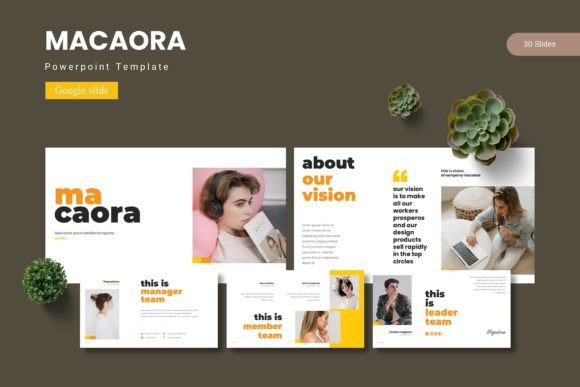
Think of a presentation template not just as a set of slides, but as the visual DNA for a project. The Macaora template is built on this principle. Its handcrafted infographics and pixel-perfect illustrations aren't just decorative elements; they are communication tools. A well-designed chart can explain a complex process faster than a paragraph of text. A cohesive color scheme across 30 slides builds a subconscious sense of reliability and professionalism. This consistency is the bedrock of strong brand recognition. When your internal team meeting slides, your client pitch deck, and your webinar graphics all share the same modern typography and visual language, you're not just presenting information—you're reinforcing an identity.
The real power lies in its adaptability. With five premade color variations, you can instantly align the template with an existing brand palette or use it to explore new directions. The drag-and-drop picture placeholder system means swapping in your own product shots or team photos takes seconds, not minutes. This isn't about forcing your content into a rigid box; it's about giving your content a superior stage on which to perform.
Practical Applications: From Boardroom to Social Feed
The utility of a design asset like Macaora extends far beyond a quarterly business review. Its clean, modern aesthetic makes it a versatile workhorse for numerous creative and commercial projects. Consider these real-world applications:
- Brand & Marketing Collateral: Use the template as a starting point for a comprehensive brand guidelines deck. The section break slides are perfect for delineating chapters on logo usage, color codes, and typography rules. The gallery slides can showcase your brand in action across various applications.
- Digital Products & Content Creation: For course creators and bloggers, the template can become the foundation for a signature workshop or a visually engaging lead magnet. The infographic slides help break down educational content into digestible, shareable graphics for platforms like Instagram or Pinterest.
- Pitch Decks & Proposals: Entrepreneurs and small business owners can leverage the structured layouts to tell a compelling story to investors or clients. The portfolio slides allow you to showcase past work with confidence, while the data visualization elements help present metrics clearly and persuasively.
- Event & Project Planning: The template can be repurposed as a dynamic project plan, a conference agenda, or a workshop outline. The ability to resize and edit all graphics means you can create matching promotional posters or social media teasers directly from the same file, ensuring total visual harmony.
Making It Work: A Designer's Perspective on Customization
Having a premium template is one thing; making it uniquely yours is another. The key is to view the Macaora structure as a guide, not a gospel. Start by swapping the placeholder images with high-quality, relevant photography that reflects your brand's personality. Then, dive into the color scheme. While the five provided options are excellent starting points, don't be afraid to use the master slide functionality to input your exact brand hex codes for true consistency.
Typography is your silent communicator. The template likely pairs a clean sans serif font for body text with a more distinctive display font for headlines. This is a classic and effective font pairing strategy. When customizing, maintain this hierarchy. Use the bold, modern typeface for key takeaways and the simpler font for explanatory text to ensure optimal readability, whether viewed on a projector screen or a mobile device. Always test your final slides at actual presentation scale to check for visual balance and legibility.
Finally, think about the flow. The 150+ total slides are a library, not a mandate for a single presentation. Curate a selection of 10-15 slides that best serve your narrative. Use the section breaks strategically to give your audience mental pauses and to signal a shift in topic. This thoughtful curation is what separates a generic slideshow from a professional, engaging experience that holds attention and drives your message home.