Luiza - Powerpoint Template: A Visual Toolkit for Confident Presentations
Imagine stepping into your next client pitch, team meeting, or webinar knowing your slides are already halfway to winning the room. That’s the kind of quiet confidence a well-organized, visually cohesive presentation template provides. The Luiza - Powerpoint Template is built for exactly that moment—when you need your ideas to land clearly and memorably, without spending hours wrestling with layout grids or color palettes.
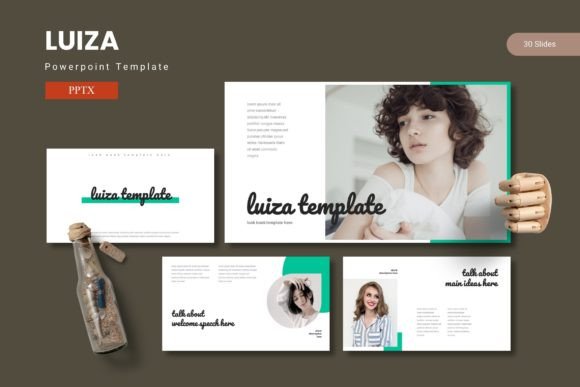
At its core, Luiza is more than just a collection of slides. It’s a design system. With over 150 total slides spread across five premade color schemes, it offers a structured yet flexible foundation for anyone who communicates ideas visually. Whether you’re a small business owner explaining your services, a marketer presenting quarterly results, or a designer pitching a new brand identity, the template gives you the tools to organize content in a way that feels both professional and engaging.
Why Visual Consistency Matters in Modern Communication
One of the biggest challenges in presentation design is maintaining visual harmony from the first slide to the last. A mismatched font here, an inconsistent color there—it can subtly undermine your credibility. Luiza addresses this by using a master slide framework. This means every slide you choose from the template shares the same underlying design DNA: consistent margins, typography scales, and element spacing.
The result? Your presentation flows naturally. Your audience isn’t distracted by awkward alignments or clashing visuals. Instead, they focus on your message. This kind of visual consistency is crucial not just for presentations, but for brand identity as a whole. When your slides match the look and feel of your website, social media graphics, or packaging, you reinforce recognition and trust.
Practical Applications Beyond the Boardroom
While Luiza is designed for PowerPoint, its utility stretches far into other areas of creative and business work. Think of it as a design asset that can adapt to multiple contexts.
For small business owners, it’s perfect for creating investor decks, product launch guides, or even visual proposals for clients. The included infographic slides help turn complex data—like sales figures or process workflows—into clear, digestible visuals. No need to hire a designer for every chart or graph.
Content creators and bloggers can repurpose the template’s layouts for video storyboards, podcast outlines, or even Instagram carousel graphics. The drag-and-drop picture placeholders make it easy to swap in your own images, maintaining a polished look without advanced technical skills.
Those in marketing or branding will appreciate the section break slides, which provide natural pauses in a presentation. Use them to introduce a new campaign phase, highlight key metrics, or transition between team updates. The five color variations also let you quickly adapt the template to match a client’s brand palette or a seasonal campaign.
How Luiza Supports Better Audience Engagement
A presentation isn’t just about sharing information—it’s about holding attention. Luiza’s design leans on modern typography and balanced white space to create slides that are easy to scan. The text hierarchy is clear, with headings, subheadings, and body text that guide the eye naturally.
The pixel-perfect illustrations and handcrafted infographics add visual interest without overwhelming the content. This balance is key. Overly busy slides can cause cognitive overload, while overly sparse ones might fail to emphasize important points. Luiza finds a middle ground, offering enough visual variety to keep viewers engaged while ensuring your message remains front and center.
For those who think about font pairing in their broader design work, the template’s typography choices can serve as inspiration. While the specific fonts used in Luiza are detailed in the included readme file, the way they’re combined—often a clean sans-serif for headings with a readable body font—demonstrates a practical approach to pairing that you can apply to websites, print materials, or social media graphics.
Getting the Most Out of the Template’s Features
To truly leverage Luiza, start by exploring the folder structure. The main files include five PPTX items, each corresponding to a different color scheme. This allows you to quickly switch between palettes depending on the context of your presentation—perhaps using a muted tone for a formal report and a brighter one for a creative workshop.
Take time to review the 30 slides in each template variation. You’ll find layouts for timelines, team introductions, quote slides, portfolio galleries, and more. Instead of starting from scratch each time, you can mix and match these pre-designed sections to build a custom presentation that still looks cohesive.
The editable graphics are another standout feature. Every icon, chart, and illustration can be resized and recolored. This flexibility is invaluable if you need to adapt the template for different clients or projects. It also means you can maintain visual consistency across multiple presentations, reinforcing your professional image over time.
Considering Commercial Use and Licensing
For entrepreneurs and agencies, licensing is always a consideration. While the specific terms for Luiza are outlined in its documentation, most premium templates like this are licensed for both personal and commercial use. This means you can use the slides for client work, paid webinars, or internal business presentations without additional fees.
Always double-check the readme file for details on font and photo licensing, especially if you plan to distribute the final presentation widely. Some fonts included in templates may require separate licenses for commercial embedding, so it’s worth verifying before sharing files externally.
Ultimately, a template like Luiza is an investment in efficiency and professionalism. It saves you time on design, reduces the back-and-forth with clients over aesthetics, and helps you deliver ideas with clarity and impact. Whether you’re building a brand, pitching a service, or teaching a skill, having a reliable visual framework lets you focus on what really matters: connecting with your audience.